What Is a Web Designer? What They Do, Skills, Responsibilities & Why Businesses Need One
What is a web designer? Learn what web designers actually do, how they differ from developers, the skills they need, and when your business should hire one.
AutoByte Design Lab
Every successful website begins with decisions about how it should look, feel, communicate, and guide visitors. Where should the navigation go? Which information deserves the most attention? How should the website appear on a smartphone? What should happen when someone clicks a button? How do you make a website visually distinctive without making it difficult to use?
Many of these decisions fall within web design services. So, what is a web designer?
The Definition of Modern Web Design:
A web designer is a professional who plans and creates the visual appearance, layout, user experience, and interactive elements of a website. Web designers combine creativity with usability principles to turn business requirements, content, and brand identity into digital experiences that are attractive, intuitive, responsive, and designed around user goals.
A great web designer considers the business, the user, the brand, the content, and the conversion journey together.
What Is a Web Designer?
A web designer is responsible for designing the visual and experiential aspects of a website. They determine how different elements work together to create a coherent digital experience:
Transforming Business Requirements Into Interfaces:
A business might say: “We need a website that generates consultation requests.” The designer determines how the homepage communicates the value proposition, how services are organized, where trust signals appear, how visitors navigate between pages, and where consultation calls to action should be positioned.
The designer isn't simply decorating a webpage. They are organizing information and interactions around a commercial purpose.
What Does a Web Designer Do?
A web designer's work begins long before colors or imagery are selected. First, the designer needs to understand what the website is supposed to accomplish:
Local Service Company
Objective: Generating inbound phone calls, quote requests, and building immediate local trust.
eCommerce Business
Objective: Frictionless product discovery, intuitive filtering, transparent shipping, and checkout conversion.
SaaS Enterprise
Objective: Explaining complex product architectures simply and encouraging demo bookings or free trials.
The Architectural Design Workflow
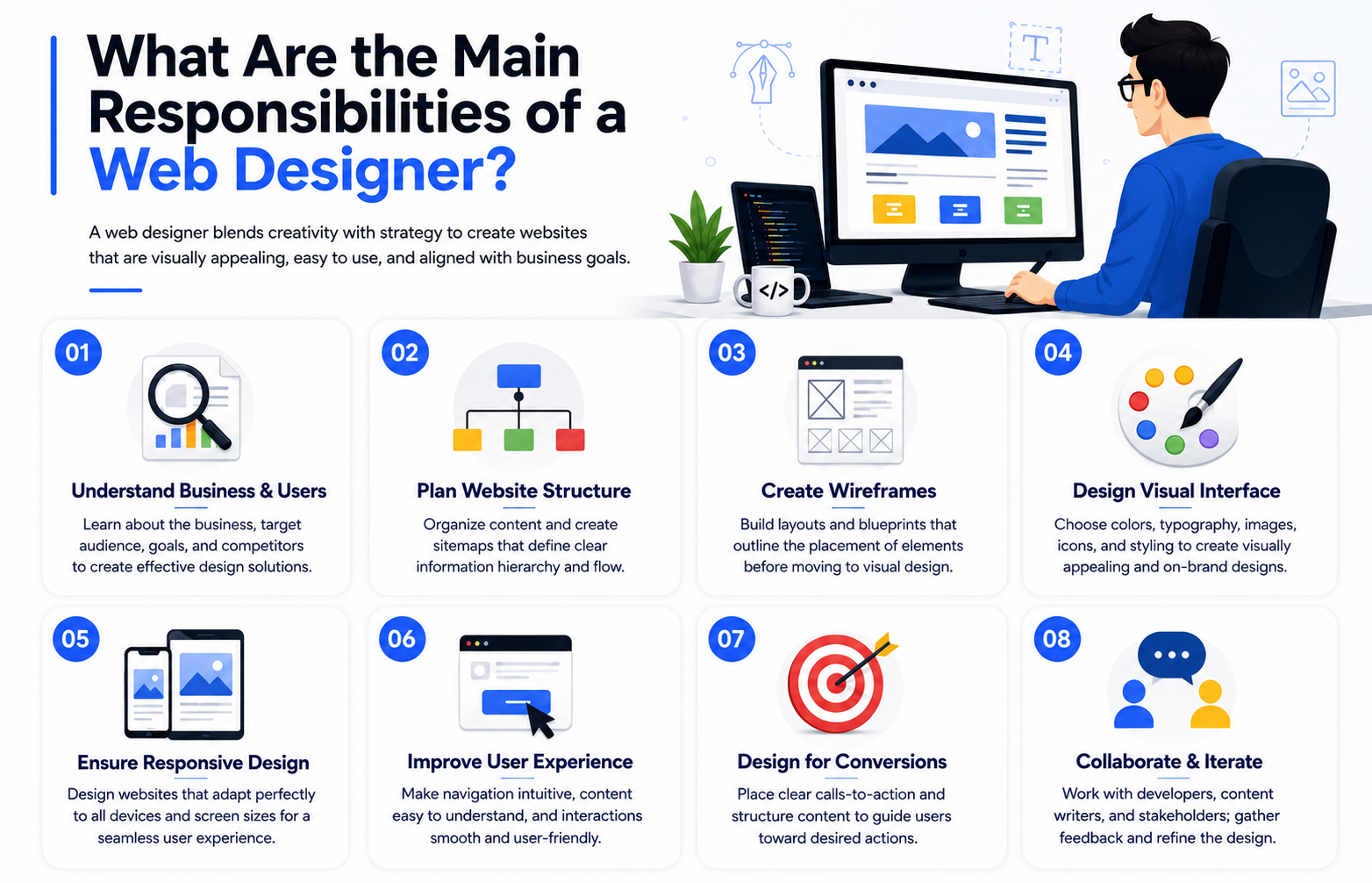
What Are the Main Responsibilities of a Web Designer?
1. Understanding Business & Users
Before sketching a single wireframe, a web designer uncovers business goals, target customers, competitor moats, brand identity, customer pain points, conversion bottlenecks, and existing analytics. Instead of asking “Does this look cool?”, they ask: “Does this design help the visitor understand our value and take the next step?”
2. Planning Website Structure & Information Architecture
Organizes content hierarchically so users never get lost. Visitors should instantly know: Where am I? Where can I go? How do I find what I need?
├── About Us
├── Services (Web Design, Custom Development, SEO)
├── Case Studies & Client Results
├── Blog & Educational Resources
└── Contact / Schedule Consultation
3. Creating Structural Wireframes
A wireframe is the structural blueprint for a page—mapping headers, content blocks, trust badges, testimonials, and calls to action before styling:
4. Designing Visual Interface (UI)
Establishes the design language: typography (Space Grotesk & Inter for readability), curated color palettes, spatial rhythm, bespoke iconography, and clear visual hierarchy.
5. Optimizing User Experience (UX)
Guarantees the visitor's journey flows without friction:
6. Ensuring Responsive Fluid Design
Responsive design isn't just “shrink everything”. It means rethinking how elements stack, touch targets on smartphones, navigation ergonomics, and font sizes across phones, tablets, laptops, and ultra-wide displays.
7. Designing High-Converting Calls to Action (CTAs)
Strategically positioning CTAs (“Get a Quote”, “Book a Strategy Call”, “Start Free Trial”) with surrounding social proof and benefit reinforcement.
What Skills Does a Web Designer Need?
Visual Design
Typography, color theory, composition, contrast, alignment, and spatial balance.
UX Fundamentals
User research, cognitive psychology, accessibility (WCAG), and interaction design.
Responsive Systems
Fluid layouts, CSS grid concepts, flexbox behavior, and mobile-first logic.
Brand Cohesion
Translating brand guidelines into memorable, cohesive digital design systems.
Communication
Collaborating seamlessly with developers, copywriters, and business leaders.
Strategic Problem Solving
Balancing: User Needs + Business Goals + Brand Identity + Technical Feasibility.
What Tools Do Web Designers Use?
Interface & UI Tools
Figma, Sketch, Adobe XD for design systems, layouts, and reusable component libraries.
Graphic & Asset Editing
Adobe Photoshop, Illustrator for vector illustrations, photo refinement, and web assets.
Interactive Prototyping
Figma Prototypes, Framer, and Principle for micro-animations and user flow simulations.
Handoff & Collaboration
Zeplin, Figma Inspect, Notion, and Loom for engineering handoff and client walkthroughs.
Note: Owning professional design tools doesn't make someone a professional designer. Real value comes from strategic execution.
Web Designer vs Web Developer: What's the Difference?
These roles collaborate closely but serve different phases of website creation:
| Aspect | Web Designer | Web Developer |
|---|---|---|
| Primary Focus | Appearance, emotional feel, usability & user experience | Technical implementation, backend logic & functionality |
| Deliverables | Design systems, wireframes, component libraries & interactive prototypes | Production code, database schemas, APIs & live responsive applications |
| Layout & Flow | Plans visual hierarchy, cognitive load & conversion pathways | Builds semantic HTML/CSS, Next.js components & responsive flex/grid layouts |
| Design Execution | Selects typography pairings, color harmonies & brand spacing tokens | Configures Tailwind, CSS variables, state managers & animation libraries |
| Core Tooling | Figma, Adobe Creative Suite, Sketch & UX prototyping tools | VS Code, Git, TypeScript, React, Next.js, Node.js & Docker |
| Specialization | Deep expertise in visual design, usability testing & UI/UX principles | Deep expertise in clean architecture, performance, security & SEO rendering |
Web Designer vs UI/UX Designer
UI Designer
Focuses on visual components: buttons, typography hierarchies, forms, card states, color palettes, and micro-interactions.
UX Designer
Focuses on customer research, user journey mapping, usability testing, friction reduction, and information architecture.
Web Designer
Combines UI and UX specifically for websites—balancing aesthetics, brand identity, conversion goals, and technical feasibility.
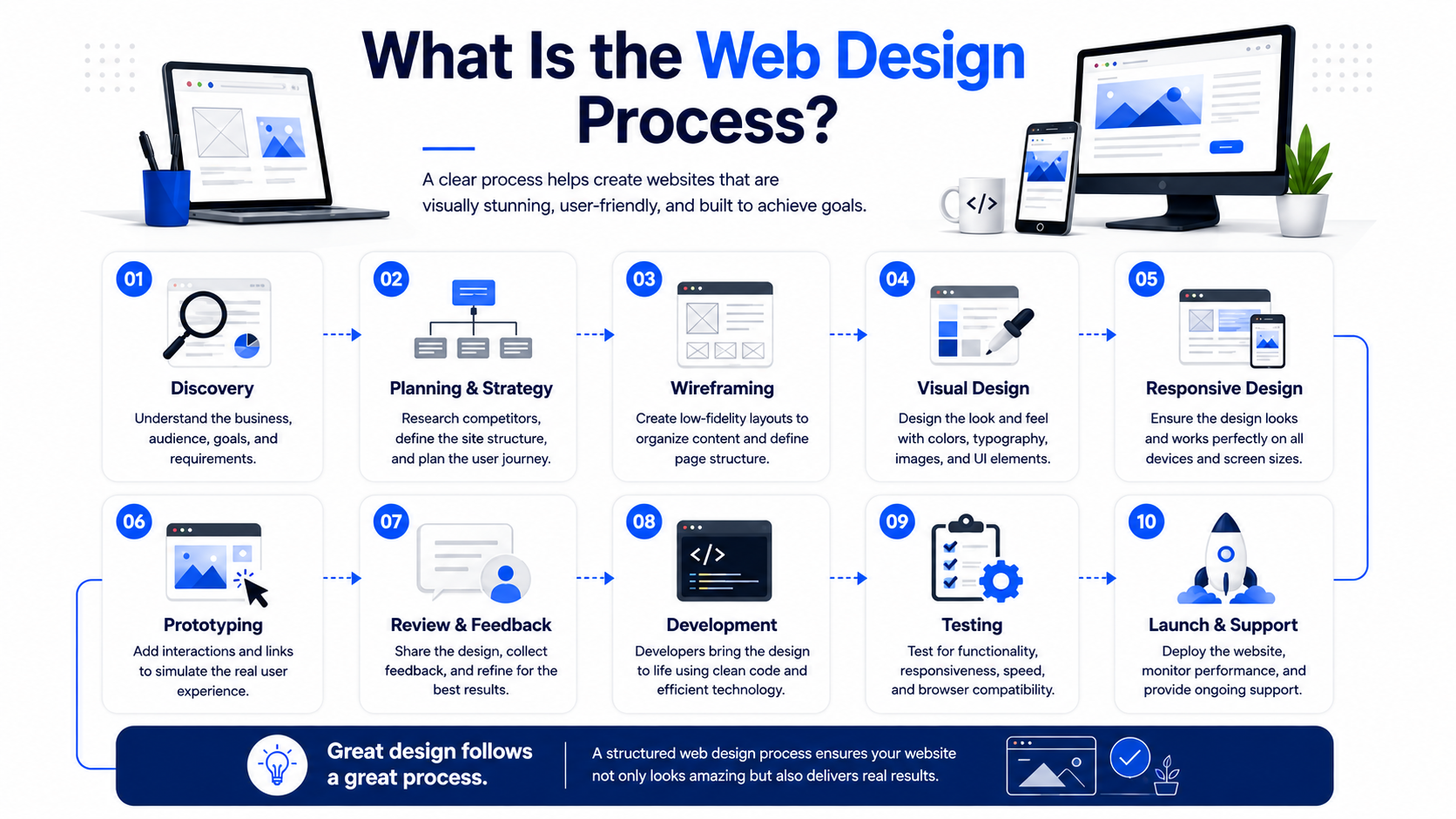
What Is the Web Design Process?
01. Discovery
Understand the business, target audience, revenue objectives, and project requirements.
02. Planning & Strategy
Research competitors, audit existing analytics, and define the user conversion journey.
03. Wireframing
Create low-fidelity layout blueprints to organize content blocks and visual hierarchy.
04. Visual Design
Design high-fidelity UI with bespoke typography, colors, photography, and UI elements.
05. Responsive Design
Adapt layouts for flawless readability and touch ergonomics across all mobile devices.
06. Prototyping
Add interactive transitions and links to simulate the real user experience.
07. Review & Feedback
Collaborate with stakeholders to gather feedback and refine details.
08. Development
Developers transform approved designs into high-performance, clean code (Next.js/React).
09. Testing
Audit browser compatibility, speed benchmarks (Core Web Vitals), and form submissions.
10. Launch & Support
Deploy the site, verify analytics tags, and provide ongoing optimization.
What Makes a Good Web Designer?
A great designer doesn't just chase fleeting aesthetic trends. When reviewing a portfolio, ask:
Do Web Designers Need to Know Coding?
Not necessarily. Designers don't need to write production backend APIs, but understanding frontend fundamentals (HTML, CSS, flexbox, CSS Grid, breakpoints, and page latency) allows them to create designs that engineers can implement cleanly without friction.
Freelance Web Designer vs Web Design Agency
Both can be excellent options depending on the scope and complexity of your project:
| Comparison Factor | Freelance Web Designer | Web Design Agency |
|---|---|---|
| Team Composition | Single specialist wearing multiple hats | Dedicated team: UI/UX designer, frontend dev, copywriter & strategist |
| Project Management | Direct one-on-one communication with the designer | Structured project manager ensuring sprint deadlines and deliverables |
| Service Breadth | Focused strictly on design or simple template setup | End-to-end: custom UX, Next.js development, technical SEO & conversion tracking |
| Scalability & Capacity | Capacity is limited to individual bandwidth | High capacity to scale fast and handle enterprise-grade custom builds |
| Ongoing Support | May have limited availability post-launch | Dedicated SLA support, performance monitoring & continuous CRO |
| Best Fit | Small brochure websites with straightforward scopes | Growth-stage companies needing high-converting, custom web infrastructure |
How Much Does a Web Designer Cost?
There is no universal price. Cost depends on page count, custom UX research, bespoke illustrations, eCommerce functionality, CMS integrations, and development scope. When comparing quotes, always ask: “What exactly is included in the design process?”
When Should You Hire a Professional Web Designer?
Redesigning shouldn't happen just because you're bored with your current site. Key signs include:
How to Choose the Right Web Designer
Pay attention to the questions they ask you. A designer who wants to understand your customer margins, competitors, sales objection points, and conversion goals will build an asset that generates revenue. Someone who only asks “What color palette do you like?” is treating your website like a painting.
Is Professional Web Design Worth It?
Your website is often the very first meaningful interaction a potential customer has with your company. Within seconds, visitors form snap judgments about your credibility, professionalism, quality, and trust.
The Complete Design Equation:
Brand Identity + User Experience + Business Objectives + Conversion Engineering + Modern Technology
Final Thoughts: A Web Designer Does More Than Make Websites Look Good
At AutoByte Solution, our approach to web design bridges visual creativity with UX architecture, responsive frontend performance, and commercial revenue objectives. The goal isn't just to deliver an aesthetically pleasing site—it is to engineer a digital asset that builds immediate trust and turns visitors into high-value clients.
Because a website can look impressive and still fail. Great web design needs both purpose and personality.
AutoByte Design Lab
Digital Experience & Interface Architecture
AutoByte Solution crafts bespoke, high-converting digital interfaces, design systems, and responsive web experiences engineered for business growth.