What Web Developers Do: Roles, Responsibilities, Skills, and How Websites Actually Get Built
Learn how developers build websites and web apps, including front-end, back-end, APIs, databases, security, testing, deployment, and maintenance.

Most people interact with the work of web developers dozens of times before lunch. You open an online store, search for a product, apply a filter, add something to your cart, sign into your account, make a payment, and receive an order confirmation. Every one of those actions depends on software working behind the screen. Professional web developers do much more than create pages that appear in a browser: they turn business requirements into scalable digital systems.
How Software Actually Gets Built: The Real Sequence
Web development is not merely typing code into an editor—it is an end-to-end engineering discipline that transforms commercial strategy into reliable software:
Business Requirement
Stakeholders identify a commercial need: online booking, eCommerce checkout, or custom customer portal.
Technical Solution & Architecture
Developers evaluate database schemas, framework choices, authentication strategy, and third-party integrations.
Code & Component Implementation
Building reusable UI components, server-side APIs, state handling, and business logic according to specifications.
Testing, QA & Edge Cases
Stress-testing invalid inputs, security boundaries, mobile responsiveness, and cross-browser reliability.
Deployment & Infrastructure
Moving verified builds to production cloud servers with SSL, CDN caching, and automated monitoring.
Real Users & Feedback
End users engage with the live software, generating analytics data and real-world edge scenarios.
Maintenance & Continuous Iteration
Patching security dependencies, refining performance bottlenecks, and expanding features as business demands scale.
1. What Do Web Developers Do?
At the highest level, web developers create and maintain the technology that makes websites and web applications function.
That can include something relatively straightforward, such as a high-converting corporate brochure website built by our Web Development Services team, or something considerably more sophisticated:
Example: What Happens Behind a "Simple" Contact Form?
To the everyday website visitor, sending a message appears trivial: Fill Form → Click Submit. But behind that single button click, a developer must design, code, and secure an entire 9-step workflow:
- Build the responsive form interface
- Validate client-side inputs (email format, required fields)
- Prevent bots and spam via Honeypot / Cloudflare Turnstile
- Transmit payload safely to server API over HTTPS
- Sanitize and store submission in a database
- Send instant email notification to sales rep
- Sync lead data directly into HubSpot or Salesforce CRM
- Redirect visitor to a dedicated Thank You page
- Fire conversion tracking events to Google Analytics 4
2. What Is a Web Developer?
A web developer is a technology professional who builds, integrates, tests, deploys, and maintains websites or browser-based applications. Web developers work with code, but writing syntax is only one aspect of the role. Their actual core responsibility is:
"Turning business requirements into reliable, secure, and intuitive digital functionality."
For example, an executive might request: "Customers should be able to book appointments online." While a web designer determines the look and visual journey, the developer must translate that single sentence into critical technical architecture:
- ✓How is real-time cleaner availability calculated across multiple staff calendars?
- ✓What happens under race conditions when two customers tap the exact same time slot simultaneously?
- ✓Does the platform capture pre-authorized credit card deposits via Stripe API?
- ✓Can clients cancel or reschedule, and what automated webhook SMS reminders are triggered?
Now a seemingly simple feature has transformed into an enterprise-grade system. A developer designs and engineers that system.
3. What Does a Web Developer Do Day to Day?
There is no single universal day in web engineering. A developer might spend Monday engineering an interactive customer dashboard and Tuesday diagnosing why an authentication session built three years ago suddenly fails on mobile Safari.
Writing Clean Code
Crafting structured, maintainable, and type-safe code across frontend UI components and backend server systems.
Reviewing Architecture & Specs
Translating business requirements into data schemas, technical blueprints, and scalable infrastructure plans.
Building Interactive Interfaces
Implementing pixel-accurate responsive layouts, accessible navigation, form validations, and fluid state management.
Integrating APIs & Third-Party Services
Connecting payment gateways (Stripe), CRMs, headless CMS platforms, calendar systems, and transactional messaging APIs.
Designing Database Schemas & Queries
Architecting relational (PostgreSQL, MySQL) and non-relational database models with indexed, high-efficiency queries.
Rigorous Testing & Debugging
Running unit, integration, and cross-browser tests while inspecting production error logs to resolve tricky edge cases.
Optimizing Performance & CWV
Minimizing bundle sizes, code-splitting, caching assets, and tuning Core Web Vitals (LCP, INP, CLS) for top rankings.
Deploying via CI/CD Pipelines
Automating cloud build steps, zero-downtime releases, rollback triggers, and SSL/DNS domain configurations.
4. Front-End vs. Back-End vs. Full-Stack Development
Web development is broadly categorized into three core engineering specializations:
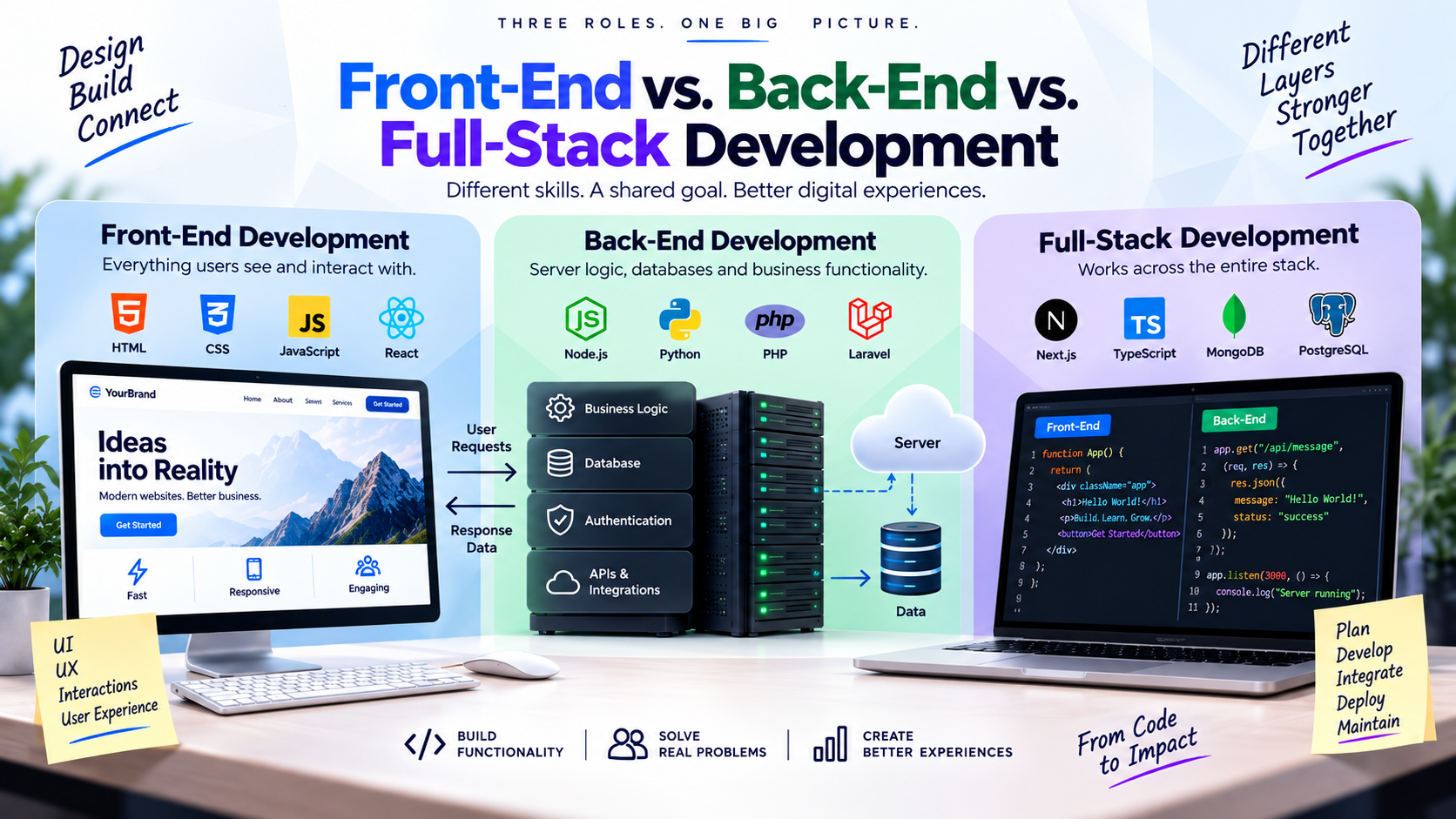
| Specialization | Primary Responsibility | Key Technologies |
|---|---|---|
| Front-End Developer | Everything users see, interact with, and navigate inside their browser. | HTML5, CSS3, JavaScript, TypeScript, React, Next.js |
| Back-End Developer | Server logic, database models, authentication, and core business workflows. | Node.js, Python, PostgreSQL, MySQL, REST/GraphQL APIs |
| Full-Stack Developer | Bridges both client interface and server infrastructure end-to-end. | Entire stack from Next.js frontend to cloud database hosting |
Explore our dedicated Custom Web Development and full-stack engineering packages to see how we blend these disciplines into high-performance web applications.
5. What Do Front-End Developers Do?
Front-end developers build the client-side environment that executes directly in the user's web browser. When a visual designer completes mockups in Figma, the front-end developer transforms those static visuals into dynamic, responsive software.
Front-end development goes far beyond "making things look right." When presented with a Figma screen, developers solve dozens of unstated operational challenges:
Responsive & Mobile Realities
What happens to complex comparison tables at 390px on an iPhone? How do navigation menus collapse into drawer sheets? How do touch gestures replace hover tooltips? Responsive engineering ensures flawless UX across thousands of display resolutions.
Accessibility & Web Standards (a11y)
Professional front-end code adheres to WCAG standards: semantic HTML tags, keyboard navigation focus rings, screen-reader ARIA descriptions, and high-contrast color ratios so every person can navigate effortlessly.
Asynchronous State & Edge States
What does the screen show while API data is loading? What occurs if an image fails to load or the customer enters 500 characters into a single-line name field? Developers engineer skeleton loaders, empty states, and fallback error states.
Modern Framework Mastery
Utilizing component-driven frameworks like React and Next.js with TypeScript to guarantee modular reusability, strict type safety, zero layout shifts, and blazing hydration speeds.
6. What Do Back-End Developers Do?
If the front end is the vehicle body and dashboard, the back end is the engine, transmission, and fuel injection system. Back-end developers engineer server-side software, databases, authentication, and core business logic.
When you enter your email and password on a portal and click Sign In, the backend performs a series of security-critical steps:
- Receives and parses the encrypted HTTPS network payload.
- Queries the database for user credentials and verifies password hashes using Argon2 or bcrypt.
- Enforces brute-force rate-limiting to prevent password spray attacks.
- Issues a cryptographically signed JWT or secure session cookie.
- Retrieves user role permissions (e.g., Admin vs. Viewer).
- Transmits sanitized account data back to the frontend without ever exposing raw system secrets.
Back-end developers ensure that business rules—such as quote calculation formulas, cleaner assignment algorithms, and multi-tier pricing—are enforced securely on the server where malicious visitors cannot tamper with them.
7. What Do Full-Stack Developers Do?
A full-stack developer works comfortably across both sides of the digital spectrum—from writing React UI components to structuring SQL database migrations and configuring cloud deployments.
While rare for one individual to know every single framework in existence, a strong full-stack developer has deep contextual mastery across all layers. This holistic perspective makes full-stack engineers invaluable for:
8. How Web Developers Turn a Design into a Website
One of the clearest ways to understand web development is to observe how a static Figma canvas transitions into a live, high-traffic commercial web application:

Step 1: Identify Reusable Components
Rather than coding 50 different buttons or testimonial cards, developers extract design tokens and build single reusable UI components that scale seamlessly.
Step 2: Construct Semantic HTML & CSS Layouts
Converting visual wireframes into clean, semantic DOM structures using CSS Flexbox, Grid, and responsive layout primitives.
Step 3: Engineer Responsive Breakpoints
Refining visual presentation across smartphones, tablets, laptops, and ultra-wide desktop monitors.
Step 4: Implement Interactive State & Animations
Wiring dropdown menus, sliders, accessible modals, filtering states, and subtle micro-animations.
Step 5: Connect Dynamic Content & CMS Data
Hooking up headless CMS endpoints (WordPress REST, Shopify Storefront API, Sanity, or PostgreSQL).
Step 6: Integrate Commercial Business Systems
Wiring payment processors, CRMs, transactional email triggers, and marketing analytics.
Step 7: Quality Assurance & Cross-Browser Testing
Verifying behavior on Chrome, Safari, Edge, Firefox, iOS, and Android under various network throttling speeds.
Step 8: Cloud Production Deployment
Configuring edge CDNs, SSL certificates, custom DNS routing, and monitoring tools.
Want to know how to select an agency with proven engineering execution? Read our comprehensive guide on How to Choose a Web Design Agency: 12 Key Factors.
9. Web Developers and Databases
Modern websites are rarely static brochure pages; they need to remember data. An eCommerce site stores products, stock levels, customer orders, and tracking numbers. A SaaS dashboard tracks user workspaces, subscriptions, and permission tiers.
Web developers architect database schemas using relational systems like PostgreSQL and MySQL, or document stores like MongoDB and Redis for real-time caching:
10. Web Developers and APIs
Application Programming Interfaces (APIs) are the digital bridges that enable distinct software platforms to exchange data securely.
Consider an online dental booking service:
Developers must build fault-tolerant integrations. What happens if Stripe experiences a 504 Gateway Timeout? What if an SMS webhook fires twice? Developers implement idempotency keys, exponential backoff retries, and comprehensive error logging to ensure transactions never disappear into thin air.
11. Web Development and Security
A website that looks stunning but exposes customer records is a liability. Security is an indispensable responsibility of professional web development:
SQL Injection (SQLi)
Preventing attackers from manipulating database queries through malicious form input by enforcing parameterized queries and ORMs.
Cross-Site Scripting (XSS)
Sanitizing user-submitted HTML and implementing Content Security Policy (CSP) headers to block malicious client-side JavaScript execution.
AuthN vs. AuthZ Protection
Ensuring users are not only authenticated (who they are) but also authorized (preventing Tenant A from accessing Tenant B's financial invoices).
12. Web Performance and Optimization
Users will abandon a website if pages take more than 3 seconds to load. Modern developers obsess over performance tuning and Google Core Web Vitals:
- ✓Image Optimization: Serving responsive WebP/AVIF formats with correct aspect ratios and lazy loading below-the-fold assets.
- ✓Code Splitting: Delivering only the JavaScript necessary for the current view instead of forcing a massive bundle on first load.
- ✓Edge Caching: Leveraging Global CDNs to deliver static assets with sub-50ms latency worldwide.
Curious why site speed is critical for Google rankings? Check our in-depth analysis: How Important Is Page Speed for SEO? Real-World Data & Impact.
13. Testing and Debugging: A Major Part of Web Development
Software engineers spend a substantial portion of their time answering: "Why is this failing under specific conditions?"
Imagine checkout fails only when:
- A customer applies a discount coupon
- The cart contains a recurring subscription
- Billing and shipping addresses differ across state borders
- The customer checks out using mobile Safari with Apple Pay
Diagnosing this requires inspecting server network logs, state mutations, and browser console errors, reproducing the exact edge case, engineering a fix, and verifying that the patch does not inadvertently break standard single-item checkouts.
14. Deployment and Hosting
A web app running smoothly on a developer's MacBook is not yet ready for paying customers. Deployment moves code from local development into secure cloud infrastructure.
This involves configuring CI/CD pipelines (such as GitHub Actions), managing environment variables, configuring DNS records, provisioning SSL certificates, setting up database connection pooling, and establishing automated rollback mechanisms if health checks fail.
When migrating an existing website, developers ensure that 301 redirects are mapped precisely so organic rankings remain intact. Review our definitive guide on How to Redesign a Website Without Losing SEO.
15. What Happens After a Website Is Launched?
Launch day is not the end of web development; it is the moment real-world testing begins. As thousands of genuine users navigate your site, they uncover scenarios your staging team never imagined:
16. Web Designer vs. Web Developer: What's the Difference?
These roles are frequently conflated by business owners, yet their primary focuses are distinct:
Web Designer: Defines the Experience
- • Wireframing and visual UI layouts
- • Color palettes, contrast, and typography
- • User experience (UX) and navigation journeys
- • Brand expression, imagery, and moodboards
- • Prototyping interactive mockups in Figma
Web Developer: Implements the Experience
- • Writing clean, responsive HTML, CSS, and JS
- • Engineering APIs, database schemas, and queries
- • Form validation and payment processing
- • Authentication, session security, and permissions
- • Server infrastructure, CI/CD, and site speed
For a deep dive into the creative side, read our guide on What Is a Web Designer & What Do They Actually Do? and discover typical project costs in How Much Do Web Designers Charge? Practical Guide to Web Design Pricing.
17. What Programming Languages Do Web Developers Use?
There is no single universal programming language. The chosen stack depends entirely on the application's speed requirements, security profile, and scale:
Browser Experience & UI Interaction
Renders everything the visitor sees, clicks, and experiences. Handles client-side routing, accessibility, animations, and responsive screen adaptation.
Server Logic, Business Rules & Security
Processes user requests, handles user authentication, enforces business logic, coordinates background jobs, and protects core intellectual assets.
Data Persistence & Organization
Safely stores and retrieves application data, customer profiles, product catalogs, financial records, and indexing structures under heavy loads.
Deployment, Reliability & Speed
Builds automated deployment pipelines, manages SSL certificates, optimizes edge delivery networks, and maintains zero-downtime uptime.
18. How AI Is Changing What Web Developers Do
Modern web development is increasingly AI-assisted. Engineers leverage LLMs to generate boilerplate code, draft SQL queries, write unit tests, and diagnose cryptic error traces.
However, AI does not replace engineering judgment. The professional developer must still answer:
AI speeds up repetitive typing—it does not remove the need to understand software architecture. For an exhaustive analysis of AI coding automation, developer surveys, and production risks, read our deep-dive on Will AI Replace Web Developers? What the Future of Web Development Actually Looks Like, and explore how AI affects search engines in How Does SEO Work on AI Mode?.
19. What Makes a Good Web Developer?
Syntax memorization is the easy part. Exceptional web developers distinguish themselves through broader disciplines:
Rigorous Problem Solving
Deconstructing large, vague business needs into precise, deliverable technical modules.
Empirical Debugging
Formulating hypotheses and testing facts with logs rather than guessing randomly.
Architectural Fundamentals
Deep grasp of HTTP, browsers, caching, network latency, and relational database logic.
Commercial Acumen
Choosing solutions that align with business ROI and budget rather than personal novelty.
Security Mindfulness
Assuming every external input is untrusted and building zero-trust barriers.
Long-Term Maintainability
Writing code that a fellow engineer can understand, modify, and extend 6 months later.
Need a Custom Web Application or High-Performance Website?
At AutoByte Solution, our engineers span the entire spectrum—from responsive Next.js frontend interfaces to scalable backend APIs, database optimization, and high-converting commercial systems. View our transparent Development Packages or discuss your project with our technical leads.
20. Web Developer Frequently Asked Questions
Answers to common questions regarding roles, day-to-day work, technologies, and hiring web developers: